

Take a look at the following graphic to find your calibration score. What is the lowest number that you can just barely see?
- 1 – 9 Fantastic! Great job! You’re calibrated to print.
- 10 – 15 Good job – your calibration allows you to see some shadow detail, not all.
- 16 – 19 Better than most but you’re missing the very dark shadow details you are capable of adjusting if you could see them.
- 20-30 Not so good I am afraid…
- 31+ Poor. You’re missing the entire range of shadow detail which is what allows Piezography to exceed every other system.
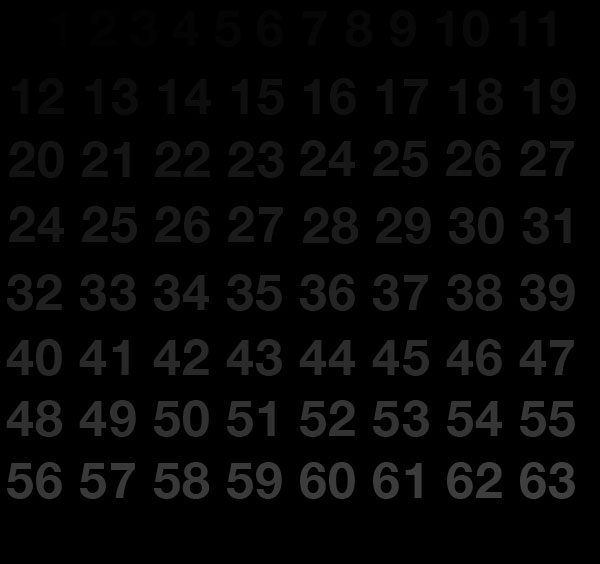
RBG values 0 - 63
The best bang for the buck in calibrator displays is the new Eizo CG222W which is a true 12 bit hardware calibrated display. Its a close to a Sony Artisan as you’re going to get for under $1,400. It can put you into the 1-9 range with a very good gray balance. Click here to buy one now at InkjetMall.
Hi, I did already a post on the piezography 3000 yahoo forum but i thought to do it here as well because it is about these tests here and to bring back thiz site alive! I just bought a brand new Eizo CG222W monitor and a X-RITE DTP94B calibrator device. I calibrated e few times under different circumstances (dark/light workroom) with the standard graphic/photography targetlist. But all i can see in the testsheet above is number 11/12 and further. That is the same result as with my old en crumpy LaCie 19Blue CRT monitor. What did I do wrong? Please advice????
Steven.
I did another test in photoshop from the Mastering Digital BW by Amadou Diallo. On page 38. Now i CAN see grey squares with a rgb value of 252/252/252 and 3/3/3. That is good i think?
The same test: I can even see RGB 222. BUT this is in a sRGB color space. When i assign my working color space, adobe(RGB) 1998, I just can see a different change in black from RGB 444/555. I don’t understand this. Why is that?